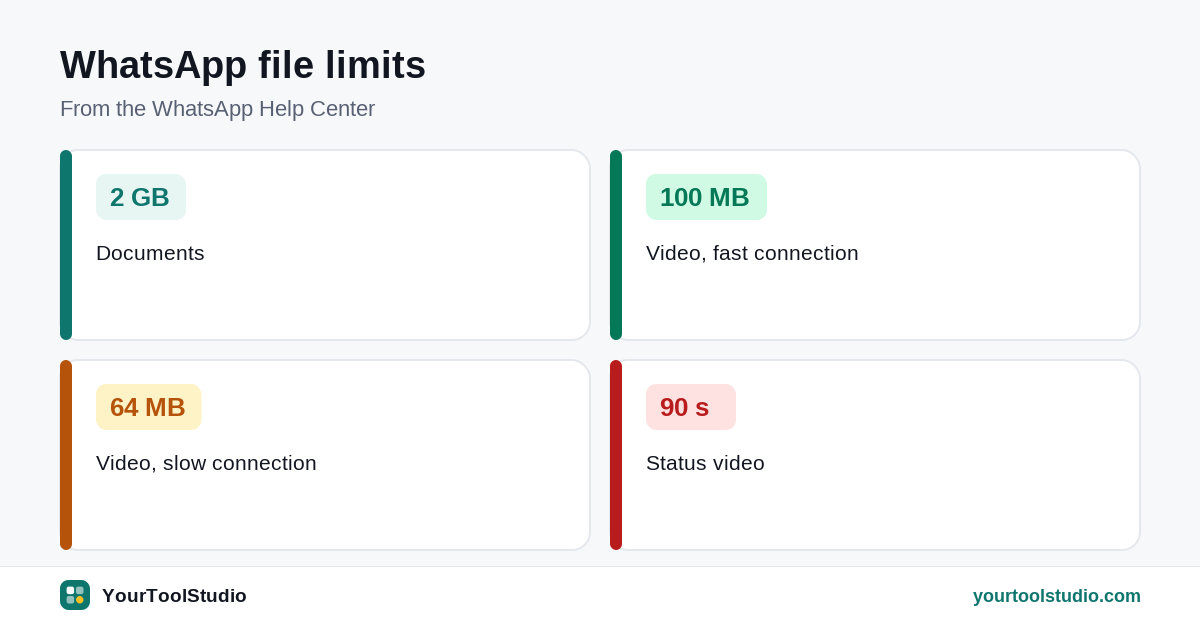
WhatsApp lets you send a document of up to 2 GB, and sets a default video limit of 100 MB at 720p on a faster connection or 64 MB at 480p on a slower one. Both figures are stated on the WhatsApp Help Center article How to send media, contacts, or location, which gives the same numbers for Android, iPhone, Web and desktop. All figures on this page were checked on 19 November 2026.
WhatsApp limits by what you send
| What you send | Limit | Where WhatsApp states it |
|---|---|---|
| Document (any file, including PDF, ZIP and video sent as a file) | 2 GB per file | Help Center, all platforms |
| Video, faster internet connection | 100 MB and 720p by default | Help Center, all platforms |
| Video, slower internet connection | 64 MB and 480p by default | Help Center, all platforms |
| Status video | 90 seconds maximum | Help Center, all platforms |
| Photos or videos picked at once | Up to 100 | Help Center, Android and Web |
| Video formats accepted | 3GP, AVI, FLV, MKV, MOV, MP4 | Help Center, all platforms |
Where 16 MB and the other numbers come from
The search suggestions for this topic include 16 MB, 32 MB, 64 MB, 100 MB and 2 GB. The table below matches each number with what it refers to today, based on the official pages opened for this chart.
| Number you may see | What it refers to |
|---|---|
| 2 GB | The current document limit in the WhatsApp app. The WhatsApp Blog announced it on 5 May 2022 |
| 100 MB | Today the default video limit on a fast connection. It was also the document limit before May 2022, according to the same blog post, and it is the largest media file the Business Cloud API accepts |
| 64 MB | The default video limit on a slower connection |
| 16 MB | The video and audio limit for messages sent through the WhatsApp Business Cloud API. It is not stated as a limit for personal chats on the Help Center pages checked |
| 32 MB | Not found on any official WhatsApp or Meta page opened for this chart |
WhatsApp Business Cloud API limits
Businesses that send messages through Meta's Cloud API work under smaller limits than the app. The Meta developer media reference lists these maximum sizes:
| Media type | Formats | Maximum size |
|---|---|---|
| Audio | AAC, AMR, MP3, M4A, OGG (Opus, mono) | 16 MB |
| Document | TXT, XLS, XLSX, DOC, DOCX, PPT, PPTX, PDF | 100 MB |
| Image | JPEG, PNG, static WebP (8-bit RGB or RGBA) | 5 MB |
| Video | 3GP, MP4 (H.264 video, AAC audio) | 16 MB |
| Animated sticker | WebP | 500 KB |
| Static sticker | WebP | 100 KB |
The same page says the Cloud API supports media messages up to 100 MB. When a customer sends a larger file, the business receives error code 131052 with the title "Media file size too big". Meta also recommends encoding video with the H.264 Main or Baseline profile without B-frames, because Android WhatsApp clients do not support the High profile with B-frames.
Getting a file under the limit
| Problem | What to do | Tool |
|---|---|---|
| Video over 64 MB or 100 MB | Lower the resolution or bitrate | Compress Video |
| Long recording | Cut it to the part you need | Trim Video |
| 4K or 1080p clip | Scale it to 720p, the default WhatsApp video resolution | Resize Video |
| Video in an unusual format | Convert it to MP4 | Video Converter |
| Scanned PDF too large to share easily | Shrink the images inside it | Compress PDF |
| PDF over 2 GB | Split it into smaller parts | Split PDF |
A worked example: at 720p a typical phone clip of 2 Mbps uses about 15 MB per minute (2 megabits times 60 seconds is 120 megabits, or 15 megabytes). That fits roughly 6 minutes inside a 100 MB limit and about 4 minutes inside 64 MB, before audio. Higher bitrates fill the limit faster, so trimming or compressing is usually quicker than guessing. For files over 2 GB, share a cloud link instead and see our Google Drive limits chart or WeTransfer limits chart.
Frequently asked questions
What is the WhatsApp file size limit for documents?
2 GB per file. The WhatsApp Help Center gives this limit for Android, iPhone, Web and desktop.
What is the WhatsApp video size limit?
By default 100 MB at 720p on a faster connection and 64 MB at 480p on a slower one, according to the WhatsApp Help Center.
Is the WhatsApp limit still 16 MB?
Not for documents or default video in the app. 16 MB is the audio and video limit for the WhatsApp Business Cloud API, as listed in Meta developer documentation.
How do I send a large video on WhatsApp without losing quality?
Attach it with Document instead of Gallery. It is sent as the original file, up to 2 GB, but must be downloaded before it plays.
How long can a WhatsApp Status video be?
Up to 90 seconds, according to the WhatsApp Help Center.
Which video formats does WhatsApp accept?
The Help Center lists 3GP, AVI, FLV, MKV, MOV and MP4.