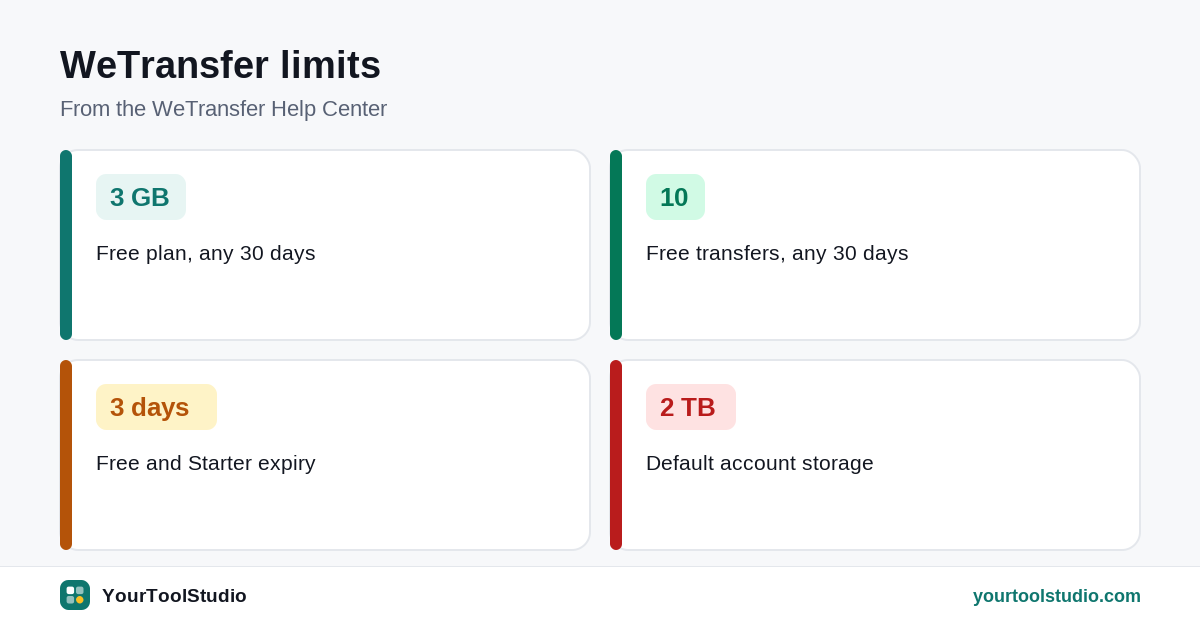
WeTransfer's plan limits page says the Free plan allows up to 10 transfers or 3 GB in total in any 30-day rolling window, and Starter allows 10 transfers or 300 GB. Ultimate and above have unlimited transfers. Free and Starter transfers stay online for up to 3 days. All figures below come from the WeTransfer pages linked here, checked on 19 November 2026.
WeTransfer limits by plan
| Plan | Transfers in any 30 days | Data in any 30 days | How long a transfer stays online | Recipients per email transfer |
|---|---|---|---|---|
| Free | Up to 10 | 3 GB in total | Up to 3 days | 10 |
| Starter | Up to 10 | 300 GB in total | Up to 3 days | 50 (paid plans) |
| Ultimate | Unlimited | No per-transfer size cap | As long as you like | 50 (paid plans) |
| Teams | Unlimited, as Ultimate | As Ultimate | As Ultimate | 50 (paid plans) |
| Enterprise | Custom contract | Custom contract | Custom contract | Not listed separately |
How the 30-day window works
The allowance is not reset on a calendar date. WeTransfer counts the transfers you sent in the last 30 days, and each one frees its slot when it falls outside that window. A worked example in the same style as the Help Center:
| Date | What happens | Free slots left |
|---|---|---|
| 1 March | You send 4 transfers | 6 |
| 10 March | You send 6 transfers | 0 |
| 31 March | The 4 transfers from 1 March leave the 30-day window | 4 |
| 9 April | The 6 transfers from 10 March leave the window | 10 |
The same rule applies to the 3 GB data total. To see what is left, hover over your account email in the top-right corner of the website, or open the Transfers tab and look under Sent.
Storage, expiry and recovery
| Item | Published figure |
|---|---|
| Default account storage | Up to 2 TB, counting live and recoverable transfers |
| Teams storage | Up to 5 TB, extendable to 30 TB on request |
| Enterprise storage | Custom, agreed in the contract |
| Files uploaded through someone else's branded page | Available for 30 days |
| Recovering an expired transfer | Ultimate, Teams and Enterprise only, if recovery was enabled when sending |
| Recovery window, files under 256 MiB | Up to one year after expiry |
| Recovery window, files over 256 MiB | Up to 90 days after expiry |
| Active transfers after cancelling a paid plan | Deleted 28 days after the cancellation |
WeTransfer's availability page says the expiry is counted from the moment a transfer is sent. On Free there is no recovery, so a recipient who misses the 3-day window needs you to send the files again.
Sending and recipient limits
| Item | Published figure |
|---|---|
| Recipients per email transfer, Free | 10 |
| Recipients per email transfer, paid plans | 50 |
| Recipients on mobile web without logging in | 3 |
| Link transfers | No recipient field, share the link anywhere |
| File types | Any file type is accepted |
| Upload and download speed | The same on Free and paid plans |
The sending guide recommends the desktop browser for larger transfers, and notes that folders are flattened into a single zip unless you zip them first to keep their structure.
Why the size looks different
WeTransfer explains that it shows the true file size, while your computer often shows the size on disk, which is usually larger. A folder that Windows reports as 3.1 GB on disk may therefore still fit under 3 GB. WeTransfer also rounds sizes to the nearest whole number on screen.
Fitting a transfer under 3 GB
| File | What to do | Tool |
|---|---|---|
| Video recording | Lower the resolution or bitrate before sending | Compress Video |
| Long clip with unused parts | Cut the start and end | Trim Video |
| Scanned or image-heavy PDF | Shrink the images inside it | Compress PDF |
| Very long document | Send it in parts over two transfers | Split PDF |
For files that must stay online longer than 3 days, a cloud drive link may suit better. Compare our Google Drive limits chart and Dropbox limits chart.
Frequently asked questions
What is the WeTransfer file size limit on the free plan?
WeTransfer lists up to 10 transfers or 3 GB in total in any 30-day rolling window on Free, so a single free transfer can be up to 3 GB.
Does the WeTransfer free limit reset every month?
No. It is a rolling 30-day window, so each transfer frees its slot and its data 30 days after it was sent.
How long do WeTransfer files last?
Up to 3 days on Free and Starter. On Ultimate you can keep transfers online for as long as you like.
Can I recover an expired WeTransfer?
Only on Ultimate, Teams and Enterprise, and only if recovery was enabled when sending. Files under 256 MiB can be recovered for up to a year, larger ones for up to 90 days.
How many people can I send a WeTransfer to?
Up to 10 recipients per email transfer on Free and up to 50 on paid plans. A link transfer can be shared with anyone.
Is WeTransfer faster on a paid plan?
No. WeTransfer says upload and download speeds are the same on Free and paid plans and depend on your connection.