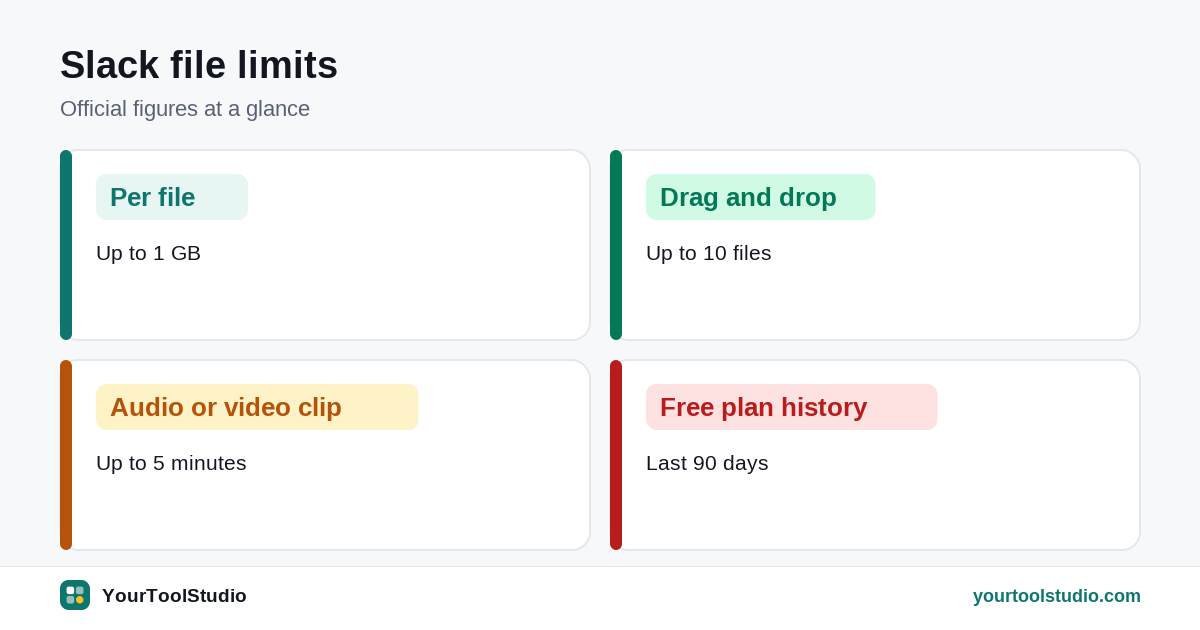
Slack lets members and guests add files of up to 1 GB each, and you can drag up to 10 files into the message field at a time. On the free plan, you can view and search only the last 90 days of messages and files. All figures below were checked on Slack's official pages on 19 November 2026.
Slack upload limits chart
| What is limited | Official limit | Applies to | Source |
|---|---|---|---|
| Size of one file | 1 GB | Members and guests | Add files to Slack |
| Files in one drag and drop | 10 files | Message field | Add files to Slack |
| Audio or video clip length | 5 minutes | All plans | Record clips |
| Email shared through the Gmail or Outlook app | 30 MB with attachments | Slack for Gmail and Slack for Outlook | Gmail app, Outlook app |
| Attachments on a shared email | 20 per email | Slack for Gmail and Slack for Outlook | Gmail app, Outlook app |
| File submitted through an app form | 100 MB, and up to 10 files | Block Kit file input element | Slack developer docs |
| Code or text snippet created by an app | 1 MB | Slack API uploads | Slack developer docs |
Free and paid plans compared
The per-file limit is not listed as a plan feature. What changes between plans is how long your files stay available.
| Plan | Message and file history | What Slack says about older content |
|---|---|---|
| Free | Last 90 days | Messages and files more than one year old are permanently deleted |
| Pro | Unlimited | Kept by default |
| Business+ | Unlimited | Kept by default |
| Enterprise+ | Unlimited | Kept by default |
These details come from Slack's pricing page and its guide to usage limits for free workspaces.
When a file uploads but shows no preview
A missing preview does not mean the upload failed. Slack only displays some large files inline, and people can still download them.
| File | Previews only when | Practical fix |
|---|---|---|
| Image | Under 45 million pixels in total, and under 25,000 pixels on the longest side | Reduce the dimensions with Resize Image |
| Microsoft Office file | 50 MB or smaller | Shrink embedded images, or export the file with PowerPoint to PDF |
File types blocked in Slack Connect
Conversations shared with other organizations have an extra rule. Slack's restricted file types list blocks these extensions in Slack Connect channels and direct messages:
| Group | Examples from Slack's list |
|---|---|
| Programs and installers | .exe, .msi, .dll, .apk, .ipa, .dmg, .appx, .msix |
| Scripts | .bat, .cmd, .ps1, .js, .vbs, .jar, .wsf |
| Disk images and archives | .iso, .img, .7z, .gz, .tar, .cab |
| Shortcuts and system files | .lnk, .scr, .sys, .cpl, .pif |
This table groups the main examples, so check Slack's page for the complete list. Workspace owners and admins can apply their own restrictions too, so ask them if a permitted file is still refused.
How to fit a file under the limit
| File | Best first step | Tool |
|---|---|---|
| Screen recording or long video | Lower the resolution and trim unused footage | Compress Video, Trim Video |
| Large PDF | Compress the images inside it | Compress PDF |
| Very long PDF | Send only the pages people need | Split PDF |
| Photos for an email shared to Slack | Reduce each file to stay under 30 MB in total | Compress Image |
If a file cannot be reduced, share a link from cloud storage instead. Our Google Drive limits chart and Dropbox limits chart show what those services accept.
Frequently asked questions
What is the Slack file upload limit?
Members and guests can add files of up to 1 GB each, according to Slack's help page on adding files.
How many files can I upload to Slack at once?
Slack says you can drag and drop up to 10 files into the message field at one time.
Does the free version of Slack limit file uploads?
Slack does not list a smaller per-file limit for the free plan. Free workspaces can view and search only the last 90 days of files, and files more than one year old are permanently deleted.
How long can a Slack video clip be?
Audio and video clips can be up to five minutes long, and Slack says the feature is available on all plans.
Why is my image not previewing in Slack?
Slack displays an image inline only when it has fewer than 45 million pixels in total and is under 25,000 pixels on its longest side. Resize the image and upload it again.
Can I send a ZIP file through Slack Connect?
The .zip extension is not on the restricted list Slack publishes for Slack Connect, although .7z, .gz and .tar are. Your organization can still apply its own rules.