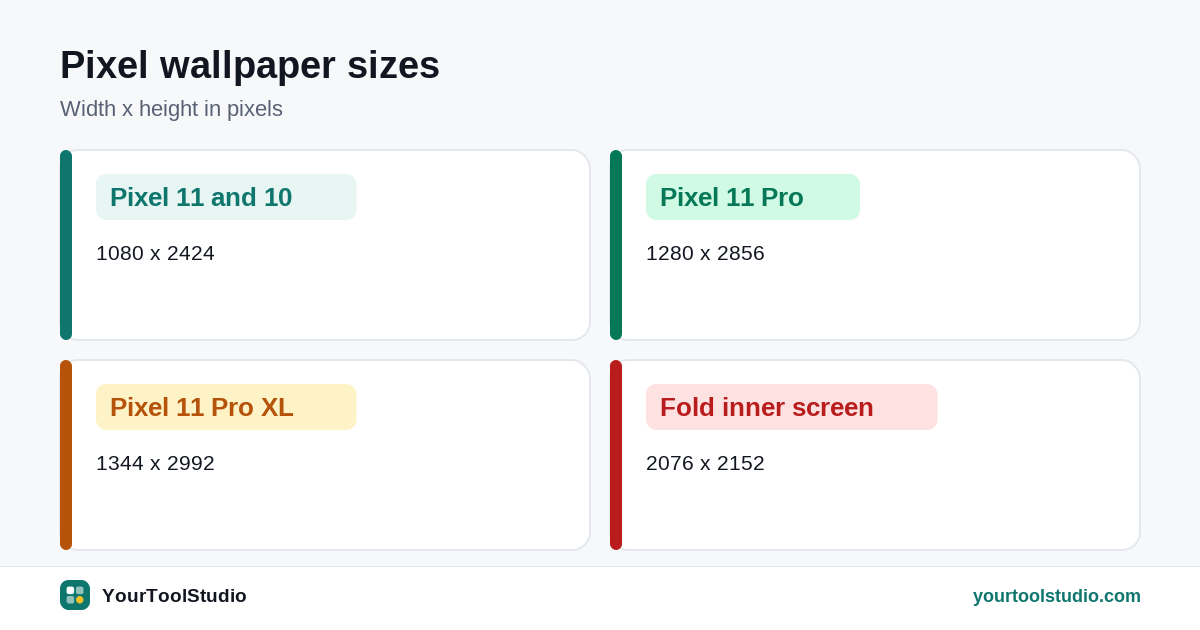
A Google Pixel wallpaper should be the same size as the phone screen in portrait: 1080 x 2424 pixels for the Pixel 11, 10, 10a, 9 and 9a, 1280 x 2856 for the Pro models and 1344 x 2992 for the Pro XL models. Older Pixel 6, 7 and 8 phones mostly use 1080 x 2400, and the inner screen of every Pixel Pro Fold is 2076 x 2152.
Wallpaper size for every Pixel phone
Google lists most phone screens as width x height in portrait, which is the shape a wallpaper needs. The aspect ratio and pixel density are as Google states them on its Pixel phone hardware tech specs page, opened on 22 November 2026.
| Model | Year | Screen | Wallpaper size (W x H) | Aspect ratio (Google) | Density |
|---|---|---|---|---|---|
| Pixel 11 Pro XL | 2026 | 6.8 in | 1344 x 2992 | 20 : 9 | 486 PPI |
| Pixel 11 Pro | 2026 | 6.3 in | 1280 x 2856 | 20 : 9 | 495 PPI |
| Pixel 11 | 2026 | 6.3 in | 1080 x 2424 | 20 : 9 | 422 PPI |
| Pixel 10a | 2026 | 6.3 in | 1080 x 2424 | 20 : 9 | 422.2 PPI |
| Pixel 10 Pro XL | 2025 | 6.8 in | 1344 x 2992 | 20 : 9 | 486 PPI |
| Pixel 10 Pro | 2025 | 6.3 in | 1280 x 2856 | 20 : 9 | 495 PPI |
| Pixel 10 | 2025 | 6.3 in | 1080 x 2424 | 20 : 9 | 422 PPI |
| Pixel 9a | 2025 | 6.3 in | 1080 x 2424 | 20 : 9 | 422.2 PPI |
| Pixel 9 Pro XL | 2024 | 6.8 in | 1344 x 2992 | 20 : 9 | 486 PPI |
| Pixel 9 Pro | 2024 | 6.3 in | 1280 x 2856 | 20 : 9 | 495 PPI |
| Pixel 9 | 2024 | 6.3 in | 1080 x 2424 | 20 : 9 | 422 PPI |
| Pixel 8a | 2024 | 6.1 in | 1080 x 2400 | 20 : 9 | 430 PPI |
| Pixel 8 Pro | 2023 | 6.7 in | 1344 x 2992 | 20 : 9 | 489 PPI |
| Pixel 8 | 2023 | 6.2 in | 1080 x 2400 | 20 : 9 | 428 PPI |
| Pixel 7a | 2023 | 6.1 in | 1080 x 2400 | 20 : 9 | 429 PPI |
| Pixel 7 Pro | 2022 | 6.7 in | 1440 x 3120 | 19.5 : 9 | 512 PPI |
| Pixel 7 | 2022 | 6.3 in | 1080 x 2400 | 20 : 9 | 416 PPI |
| Pixel 6a | 2022 | 6.1 in | 1080 x 2400 | 20 : 9 | 429 PPI |
| Pixel 6 Pro | 2021 | 6.7 in | 1440 x 3120 | 19.5 : 9 | 512 PPI |
| Pixel 6 | 2021 | 6.4 in | 1080 x 2400 | 20 : 9 | 411 PPI |
The year is the one Google files each phone under. Screen sizes are rounded as Google rounds them; Google notes that its screens have rounded corners and are measured diagonally as a rectangle, so the visible area is a little smaller.
Pixel Fold wallpaper sizes
A Fold has two screens, and Pixel lets you pick a picture for each. The outer screen is a tall phone shape, while the inner screen of the Pro Folds is almost square.
| Model | Outer screen (W x H) | Outer density | Inner screen (W x H) | Inner density |
|---|---|---|---|---|
| Pixel 11 Pro Fold | 1080 x 2342 (19.5 : 9) | 399 PPI | 2076 x 2152 | 372 PPI |
| Pixel 10 Pro Fold | 1080 x 2364 (20 : 9) | 408 PPI | 2076 x 2152 | 373 PPI |
| Pixel 9 Pro Fold | 1080 x 2424 (20 : 9) | 422 PPI | 2076 x 2152 | 373 PPI |
| Pixel Fold (2023) | 1080 x 2092 (17.4 : 9) | 408 PPI | 2208 x 1840 (6 : 5) | 380 PPI |
Google lists the first Pixel Fold outer screen as 2092 x 1080, which is the landscape order; we turned it round to portrait for the table. Its inner screen is wider than it is tall, so a wallpaper for it is a landscape picture.
One picture for several Pixels
Many Pixels share a resolution, so one file can cover several phones. This grouping is our own reading of the chart above.
| Make it this size | It fits exactly on |
|---|---|
| 1080 x 2424 | Pixel 11, 10a, 10, 9a, 9 and the 9 Pro Fold outer screen |
| 1280 x 2856 | Pixel 11 Pro, 10 Pro and 9 Pro |
| 1344 x 2992 | Pixel 11 Pro XL, 10 Pro XL, 9 Pro XL and 8 Pro |
| 1080 x 2400 | Pixel 8a, 8, 7a, 7, 6a and 6 |
| 1440 x 3120 | Pixel 7 Pro and 6 Pro |
If you want one file for every recent model, make it 1344 x 2992. On smaller screens the phone scales it down, which keeps it sharp; only an image smaller than the screen gets enlarged and soft.
How to make and set a Pixel wallpaper
- Look up the exact model name of your phone in the charts above, since a Pro and a Pro XL of the same year differ.
- Crop your photo to a tall portrait shape with Crop Image, keeping faces and text away from the top, where the clock sits on the lock screen.
- Scale it to the exact width and height with Resize Image.
- On the Home screen, touch and hold an empty space and tap Wallpaper and style. Tap More wallpapers, then Change wallpaper.
- Tap Choose a photo, pick your image, choose Lock screen, Home screen or both, then tap Preview and Apply.
Google also notes that daily wallpaper does not work with your own photos or with live wallpapers, so a custom picture stays until you change it. Making a wallpaper for an iPhone or a computer instead? See the iPhone wallpaper size chart and the desktop wallpaper size chart.
Sources and when they were checked
Opened on 22 November 2026: Google Pixel phone hardware tech specs for every model in the charts; Pixel Phone Help Change wallpaper on your Pixel phone; and Change or create a wallpaper on your Pixel phone.
Frequently asked questions
What size is a Pixel 10 wallpaper?
1080 x 2424 pixels for the Pixel 10, 1280 x 2856 for the Pixel 10 Pro and 1344 x 2992 for the Pixel 10 Pro XL, all in portrait, from Google tech specs.
What size is a Pixel 9 wallpaper?
1080 x 2424 pixels for the Pixel 9 and 9a, 1280 x 2856 for the Pixel 9 Pro and 1344 x 2992 for the Pixel 9 Pro XL.
What size is a Pixel 8 wallpaper?
1080 x 2400 pixels for the Pixel 8 and 8a and 1344 x 2992 for the Pixel 8 Pro.
What aspect ratio is a Pixel wallpaper?
Google lists 20:9 for most Pixel phones. The Pixel 7 Pro, 6 Pro and the Pixel 11 Pro Fold outer screen are 19.5:9, and the first Pixel Fold outer screen is 17.4:9.
What size wallpaper fits the Pixel Fold inner screen?
2076 x 2152 pixels on the Pixel 9 Pro Fold, 10 Pro Fold and 11 Pro Fold. The first Pixel Fold inner screen is 2208 x 1840, a landscape shape.