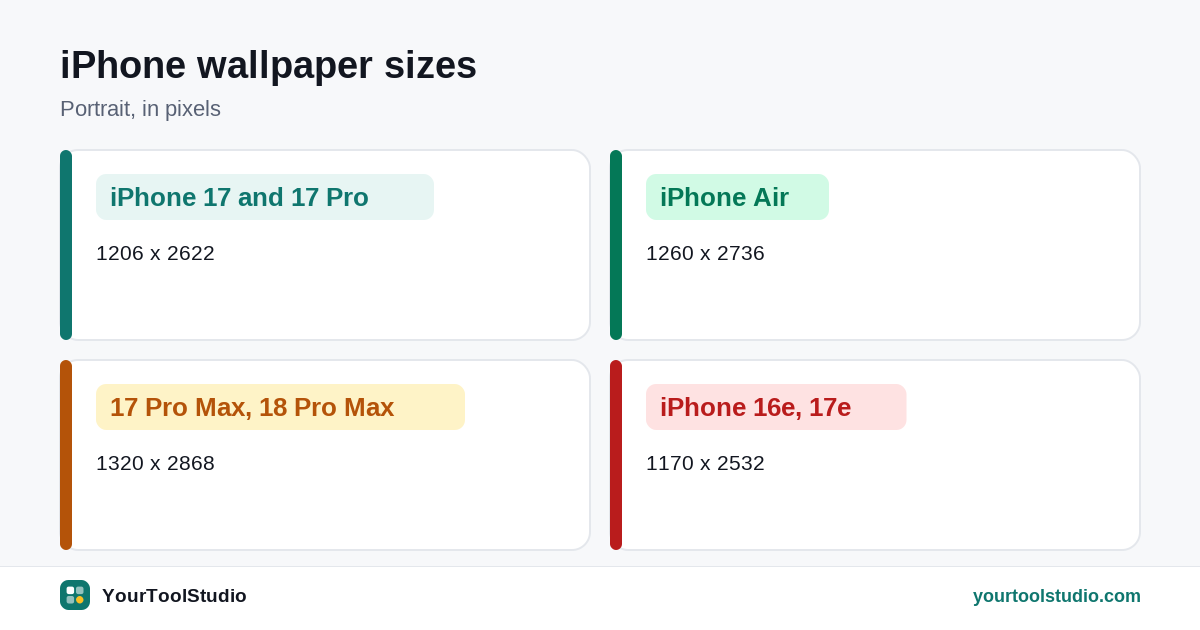
The best wallpaper size for an iPhone is its screen resolution held in portrait: 1206 x 2622 pixels for iPhone 17 and iPhone 17 Pro, 1260 x 2736 for iPhone Air and 1320 x 2868 for iPhone 17 Pro Max. Apple lists these on each model's tech specs page, written height first (for example 2622-by-1206-pixel resolution). We read every figure below on Apple's own pages on 22 November 2026.
Wallpaper size by iPhone model
| Model | Screen | Wallpaper size (width x height) | Pixel density | Aspect ratio |
|---|---|---|---|---|
| iPhone 18 Pro Max | 6.9 inch | 1320 x 2868 | 460 ppi | About 1 : 2.17 |
| iPhone 18 Pro | 6.3 inch | 1206 x 2622 | 460 ppi | About 1 : 2.17 |
| iPhone 17 Pro Max | 6.9 inch | 1320 x 2868 | 460 ppi | About 1 : 2.17 |
| iPhone 17 Pro | 6.3 inch | 1206 x 2622 | 460 ppi | About 1 : 2.17 |
| iPhone 17 | 6.3 inch | 1206 x 2622 | 460 ppi | About 1 : 2.17 |
| iPhone Air | 6.5 inch | 1260 x 2736 | 460 ppi | About 1 : 2.17 |
| iPhone 17e | 6.1 inch | 1170 x 2532 | 460 ppi | About 1 : 2.16 |
| iPhone 16 Pro Max | 6.9 inch | 1320 x 2868 | 460 ppi | About 1 : 2.17 |
| iPhone 16 Pro | 6.3 inch | 1206 x 2622 | 460 ppi | About 1 : 2.17 |
| iPhone 16 Plus | 6.7 inch | 1290 x 2796 | 460 ppi | About 1 : 2.17 |
| iPhone 16 | 6.1 inch | 1179 x 2556 | 460 ppi | About 1 : 2.17 |
| iPhone 16e | 6.1 inch | 1170 x 2532 | 460 ppi | About 1 : 2.16 |
Screen sizes are Apple's diagonal figures. The aspect ratio is our own division of height by width, rounded, and is the shape to crop your picture to so nothing important is cut off.
iPhone Duo
The folding iPhone Duo has two displays, so it needs two sizes if you want both to look sharp. Apple lists the inner folding display as 7.6 inch with a 1878-by-2670-pixel resolution at 430 ppi, and the outer display as 5.4 inch with a 1398-by-2034-pixel resolution at 460 ppi. Unlike the other models, Apple does not say on that page which figure is the height, so check how your image fills the screen in the wallpaper preview before saving. The Apple pages we opened do not say how a single wallpaper is shared between the two screens.
Which models share a size
| Wallpaper size | Fits these models |
|---|---|
| 1320 x 2868 | iPhone 16 Pro Max, 17 Pro Max, 18 Pro Max |
| 1206 x 2622 | iPhone 16 Pro, 17, 17 Pro, 18 Pro |
| 1260 x 2736 | iPhone Air |
| 1290 x 2796 | iPhone 16 Plus |
| 1179 x 2556 | iPhone 16 |
| 1170 x 2532 | iPhone 16e, 17e |
If you make one wallpaper for several people, design it at 1320 x 2868. It is the largest of these and has almost the same shape as the others, so iOS can scale it down with very little cropping.
How to make a wallpaper fit
- Find your model above and note the width and height.
- Crop the photo to that shape with Crop Image: choose Free, then type the width and height in pixels under Crop area (for example 1206 and 2622 on a large photo), so iOS does not crop it for you.
- Resize it to the exact pixels with Resize Image. Making a small image larger will not add detail, so start from a photo at least as big as the target.
- Save it to Photos, then go to Settings, Wallpaper, Add New Wallpaper and choose Photos.
Apple's guide also lets you tap Set as Wallpaper Pair to use the same picture on the Lock Screen and Home Screen, or Customize Home Screen to pick a colour, a different photo or Blur for the Home Screen.
Why other charts show different numbers
- Mixed up models. 1290 x 2796 is iPhone 16 Plus, not iPhone 17 Pro Max, and 1206 x 2622 is the 6.3 inch models, not the 6.9 inch ones.
- Order of the numbers. Apple writes height first; wallpaper sites usually write width first. 2622-by-1206 and 1206 x 2622 are the same screen.
- Points instead of pixels. App developers measure screens in points, which are smaller numbers than pixels. A wallpaper needs the pixel figure.
- Unofficial pages. Some search results are copied pages with random sizes. Trust the figure on Apple's tech specs page for your model.
Sources and when they were checked
Opened on 22 November 2026: Apple tech specs for iPhone 18 Pro and 18 Pro Max, iPhone Duo, iPhone 17e, iPhone 17 Pro Max, iPhone 17 Pro, iPhone 17, iPhone Air, iPhone 16e, iPhone 16, iPhone 16 Plus, iPhone 16 Pro and iPhone 16 Pro Max; and the iPhone User Guide page Change the wallpaper on iPhone.
Frequently asked questions
What size is an iPhone 17 wallpaper?
1206 x 2622 pixels. Apple lists iPhone 17 and iPhone 17 Pro with a 2622-by-1206-pixel resolution at 460 ppi.
What is the iPhone 17 Pro Max wallpaper size?
1320 x 2868 pixels, the same as iPhone 16 Pro Max and iPhone 18 Pro Max.
What size is an iPhone Air wallpaper?
1260 x 2736 pixels, from Apple's 2736-by-1260-pixel resolution for the 6.5 inch display.
What aspect ratio is an iPhone wallpaper?
Current models are close to 1 : 2.17, width to height. Crop to your model's exact pixels for a perfect fit.
Can one wallpaper fit every iPhone?
Nearly. Make it 1320 x 2868 and iOS scales it to smaller models with very little cropping because the shapes are almost the same.