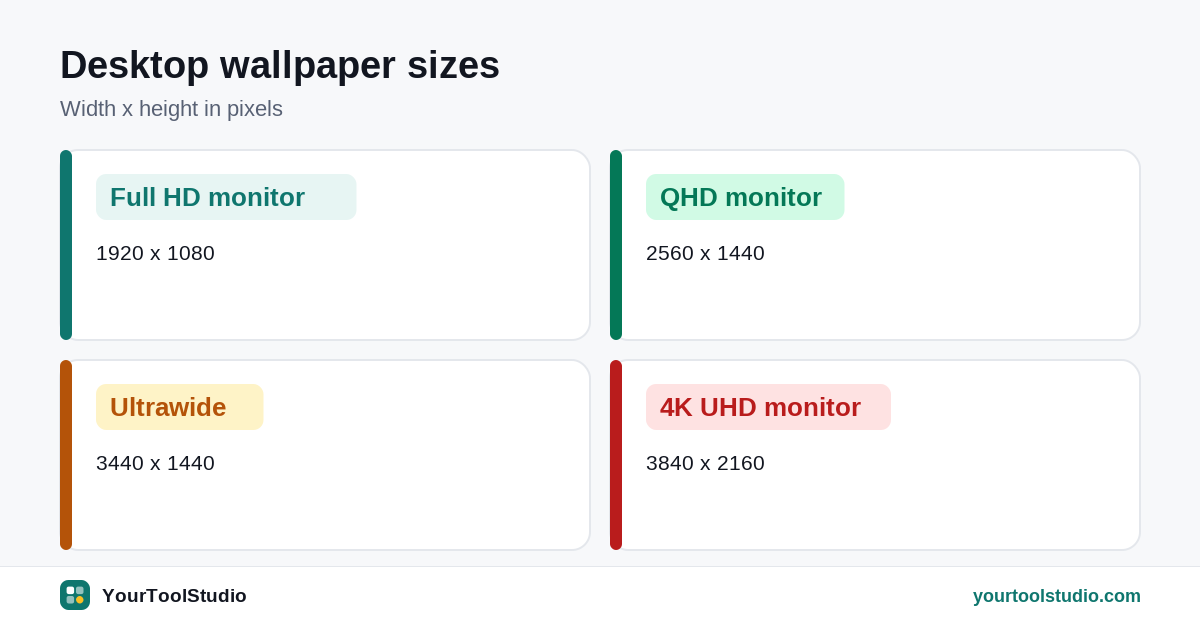
The right desktop wallpaper size is the native resolution of your monitor, which Windows marks as (Recommended) in Settings, System, Display. For most people that is 1920 x 1080 pixels; the next most common sizes are 2560 x 1440 and 3840 x 2160. Two Full HD screens side by side need a 3840 x 1080 picture if you want one image to stretch across both.
Common PC screen sizes and how many people use them
The share column comes from the Steam Hardware and Software Survey for October 2026, the latest month shown when we opened it on 22 November 2026. Steam surveys its own users, who lean toward gaming PCs, so treat the shares as a guide to popularity rather than a count of every computer.
| Resolution (W x H) | Usual name | Shape to crop to | Primary display share on Steam |
|---|---|---|---|
| 1920 x 1080 | Full HD, 1080p | 16 : 9 | 50.23 percent |
| 2560 x 1440 | QHD, 1440p | 16 : 9 | 21.82 percent |
| 2560 x 1600 | WQXGA | 16 : 10 | 5.46 percent |
| 3840 x 2160 | 4K UHD | 16 : 9 | 5.05 percent |
| 3440 x 1440 | Ultrawide QHD | 43 : 18 (sold as 21 : 9) | 3.23 percent |
| 1920 x 1200 | WUXGA | 16 : 10 | 2.97 percent |
| 1366 x 768 | HD laptop | Almost 16 : 9 | 2.25 percent |
| 1440 x 900 | WXGA+ | 16 : 10 | 0.72 percent |
| 2560 x 1080 | Ultrawide Full HD | 64 : 27 (sold as 21 : 9) | 0.68 percent |
| 1600 x 900 | HD+ | 16 : 9 | 0.66 percent |
| 2880 x 1800 | Laptop 16 : 10 | 16 : 10 | 0.54 percent |
| 5120 x 1440 | Super ultrawide | 32 : 9 | 0.42 percent |
| 1680 x 1050 | WSXGA+ | 16 : 10 | 0.40 percent |
The resolutions and shares are as Steam lists them. The names and the shapes are our own: we reduced each width and height by their largest common divisor, so 3440 x 1440 becomes 43 : 18, which is a little wider than the 21 : 9 that ultrawide monitors are sold as.
Sizes for two or three screens
Windows offers a Span fit that stretches one picture across several monitors. Add the widths of the screens that sit side by side and keep the height of one screen.
| Setup | Span wallpaper size | Shape |
|---|---|---|
| Two 1920 x 1080 screens | 3840 x 1080 | 32 : 9 |
| Three 1920 x 1080 screens | 5760 x 1080 | 16 : 3 |
| Two 2560 x 1440 screens | 5120 x 1440 | 32 : 9 |
| Two 3840 x 2160 screens | 7680 x 2160 | 32 : 9 |
These totals are our own arithmetic. In the same Steam survey, 3840 x 1080 was the most common multi-monitor desktop, at 46.80 percent of multi-monitor users. If your screens have different resolutions, Microsoft lets you set a different picture for each display instead, which avoids one screen showing a cut-off or blurry slice.
Which fit setting to choose
| Fit in Windows | What Microsoft says it does | Use it when |
|---|---|---|
| Fill | Enlarges the image to cover the screen; edges may be cropped | Your picture is close to the screen shape |
| Fit | Keeps the whole image and its shape; bars may appear | Nothing at the edges can be lost |
| Stretch | Covers the screen and may distort the picture | The picture is already the exact size |
| Tile | Repeats the image across the screen | Small patterns and textures |
| Center | Places it in the middle without resizing | Logos on a plain colour |
| Span | One image across several monitors | Dual and triple screen setups |
How to make a wallpaper that fits
- Find your size: right-click the desktop, choose Display settings and read the Display resolution row. Use the value marked (Recommended).
- Crop the picture to the shape in the first table with Crop Image, so Fill does not cut off the part you care about.
- Scale it to the exact width and height with Resize Image. Making a picture bigger than its original pixels softens it, so start from a larger photo when you can.
- Shrink a large 4K or ultrawide file with Compress Image if you want to email it or sync it between PCs.
- Open Settings, Personalization, Background, choose Picture, click Browse, then pick Fill or Span under Choose a fit.
Using a Mac instead? See the MacBook wallpaper size chart and the iMac and Studio Display chart.
Sources and when they were checked
Opened on 22 November 2026: the Steam Hardware and Software Survey, October 2026 (Primary Display Resolution and Multi-Monitor Desktop Resolution); Microsoft Support Change the desktop background in Windows; Change your screen resolution and layout in Windows; and The wallpaper might not correctly fit the screen after connecting an external display.
Frequently asked questions
What is the best size for a desktop wallpaper?
Your monitor native resolution, shown as (Recommended) in Settings, System, Display. The most common is 1920 x 1080, used on 50.23 percent of primary displays in the October 2026 Steam survey.
What size is a 1440p wallpaper?
2560 x 1440 pixels, a 16:9 shape. It was the second most common primary display in the same Steam survey, at 21.82 percent.
What size wallpaper do I need for an ultrawide monitor?
3440 x 1440 for an ultrawide QHD monitor, 2560 x 1080 for an ultrawide Full HD one and 5120 x 1440 for a 32:9 super ultrawide.
What size is a dual monitor wallpaper?
Add the widths and keep one height. Two 1920 x 1080 screens need 3840 x 1080 and two 2560 x 1440 screens need 5120 x 1440. Choose Span as the fit in Windows.
Why does my wallpaper look blurry?
Usually because the picture has fewer pixels than the screen, so Windows enlarges it. Use an image at least as large as your resolution, or choose Fit or Center instead of Fill.