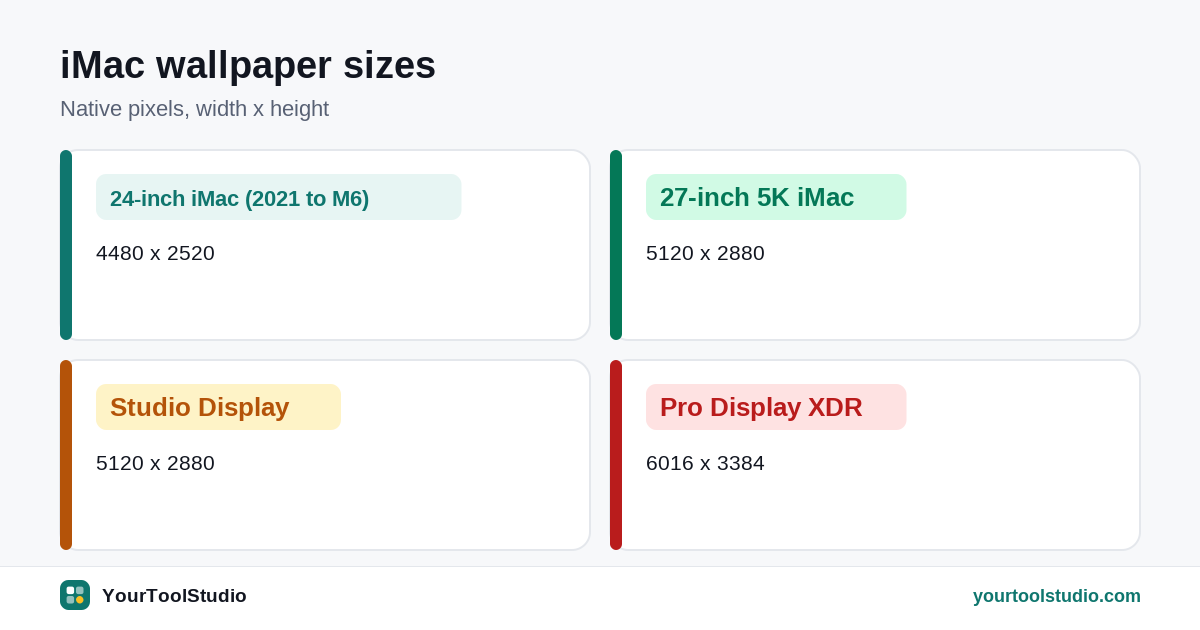
The right iMac wallpaper size is 4480 x 2520 pixels for every 24-inch iMac, from the M1 model of 2021 to the M6 models of 2026. A 27-inch Retina 5K iMac, a Studio Display and a Studio Display XDR all need 5120 x 2880, and the 32-inch Pro Display XDR needs 6016 x 3384. We read each figure below on Apple tech specs pages on 22 November 2026.
iMac wallpaper sizes by model
| Model | Screen | Wallpaper size (W x H) | Density listed by Apple |
|---|---|---|---|
| iMac 24-inch (M6, 2026), two or four ports | 4.5K Retina, 23.5 inch actual diagonal | 4480 x 2520 | 218 ppi |
| iMac 24-inch (2024), two or four ports | 4.5K Retina, 23.5 inch | 4480 x 2520 | 218 ppi |
| iMac 24-inch (2023), two or four ports | 4.5K Retina, 23.5 inch | 4480 x 2520 | 218 ppi |
| iMac 24-inch (M1, 2021) | 4.5K Retina, 23.5 inch | 4480 x 2520 | 218 ppi |
| iMac Retina 5K 27-inch (Late 2014, Mid 2015, Late 2015, 2017, 2019, 2020) | 27 inch | 5120 x 2880 | Not listed |
| iMac Pro (2017) | 27 inch Retina 5K | 5120 x 2880 | Not listed |
| iMac Retina 4K 21.5-inch (Late 2015, 2017, 2019) | 21.5 inch | 4096 x 2304 | Not listed |
| iMac 21.5-inch without Retina (Late 2013, Mid 2014, Late 2015, 2017) | 21.5 inch | 1920 x 1080 | Not listed |
| iMac 27-inch (Late 2013) | 27 inch | 2560 x 1440 | Not listed |
Apple writes these as width-by-height, for example 4480-by-2520 for the 24-inch iMac. The 24-inch name is rounded: Apple notes that the actual diagonal is 23.5 inches, but that does not change the pixel count.
Apple external displays
| Display | Screen | Wallpaper size (W x H) | Density |
|---|---|---|---|
| Studio Display | 27 inch 5K Retina | 5120 x 2880 | 218 ppi |
| Studio Display XDR (2026) | 27 inch 5K Retina XDR | 5120 x 2880 | 218 ppi |
| Pro Display XDR (2019) | 32 inch Retina 6K | 6016 x 3384 | 218 ppi |
If a MacBook or Mac mini drives one of these displays, the desktop picture on that screen should use the display size, not the size of the laptop screen. The MacBook wallpaper size chart covers the built-in laptop screens.
Every size here has the same shape
Unlike MacBook screens, which come in several slightly different shapes, every resolution in both tables divides exactly into 16 by 9. For example, 4480 divided by 16 is 280, and 280 times 9 is 2520. That is our own arithmetic from the Apple figures, and it has a useful result: a 16 : 9 picture fills any of these screens with no cropping. Only the sharpness changes.
- Make it once at 6016 x 3384 if you own a Pro Display XDR. macOS shrinks it to fit every other screen in the tables.
- Make it at 5120 x 2880 if your largest screen is a 27-inch iMac or a Studio Display. On a 24-inch iMac it is shown at 87.5 percent of its width, which still looks sharp.
- Avoid upscaling. A 4480 x 2520 picture made for the 24-inch iMac has to be enlarged by about 14 percent to fill a 5K screen, so fine lines and text soften slightly.
- A phone photo is not 16 : 9. Most photos are 4 : 3 or 3 : 2, so cut them to 16 : 9 first or macOS will trim the top and bottom for you.
How to make and set it
- Find your exact model: choose Apple menu, About This Mac, and read the model name, then match it in the first table.
- Crop the picture to 16 : 9 with Crop Image, keeping the main subject away from the top edge where the menu bar sits.
- Scale it to the exact pixels with Resize Image, typing the width and height from the table.
- Shrink the file with Compress Image if you will email it or sync it to another Mac. A 5K or 6K picture can be large.
- Open System Settings, click Wallpaper, scroll to Your Photos, click Add Photo and then Choose File. You can also Control-click the image in the Finder and choose Set Desktop Picture.
Sources and when they were checked
Opened on 22 November 2026: Apple tech specs for iMac, Studio Display and Studio Display XDR; Apple Support tech specs for iMac M6 four ports, M6 two ports, 2024 four ports, 2024 two ports, 2023 four ports, 2023 two ports, M1 2021, Retina 5K 2020, Retina 5K 2019, Retina 5K 2017, Retina 5K Late 2015, Retina 5K Mid 2015, Retina 5K Late 2014, iMac Pro, Retina 4K 2019, Retina 4K 2017, Retina 4K Late 2015, 21.5-inch 2017, 21.5-inch Late 2015, 21.5-inch Mid 2014, 21.5-inch Late 2013, 27-inch Late 2013, Studio Display XDR and Pro Display XDR; the model list in Identify your iMac model; Find the name of your Mac model; and the Mac User Guide pages Customize the wallpaper on your Mac and Change your Mac display resolution.
Frequently asked questions
What size is a 24-inch iMac wallpaper?
4480 x 2520 pixels. Apple lists the same 4.5K Retina display at 218 ppi for the M1, 2023, 2024 and M6 models.
What is the 27-inch iMac wallpaper size?
5120 x 2880 pixels for every Retina 5K model from Late 2014 to 2020 and for the iMac Pro. The non-Retina 27-inch iMac from Late 2013 is 2560 x 1440.
What size wallpaper fits a Studio Display?
5120 x 2880 pixels. Apple lists the same 27-inch 5K resolution at 218 ppi for both the Studio Display and the Studio Display XDR.
What is the Pro Display XDR wallpaper size?
6016 x 3384 pixels, the Retina 6K resolution Apple lists for the 32-inch Pro Display XDR, with a 16:9 aspect ratio.
What aspect ratio is an iMac wallpaper?
16:9. Every iMac and Apple display resolution in this chart divides exactly into 16 by 9, so a 16:9 picture fills all of them without cropping.