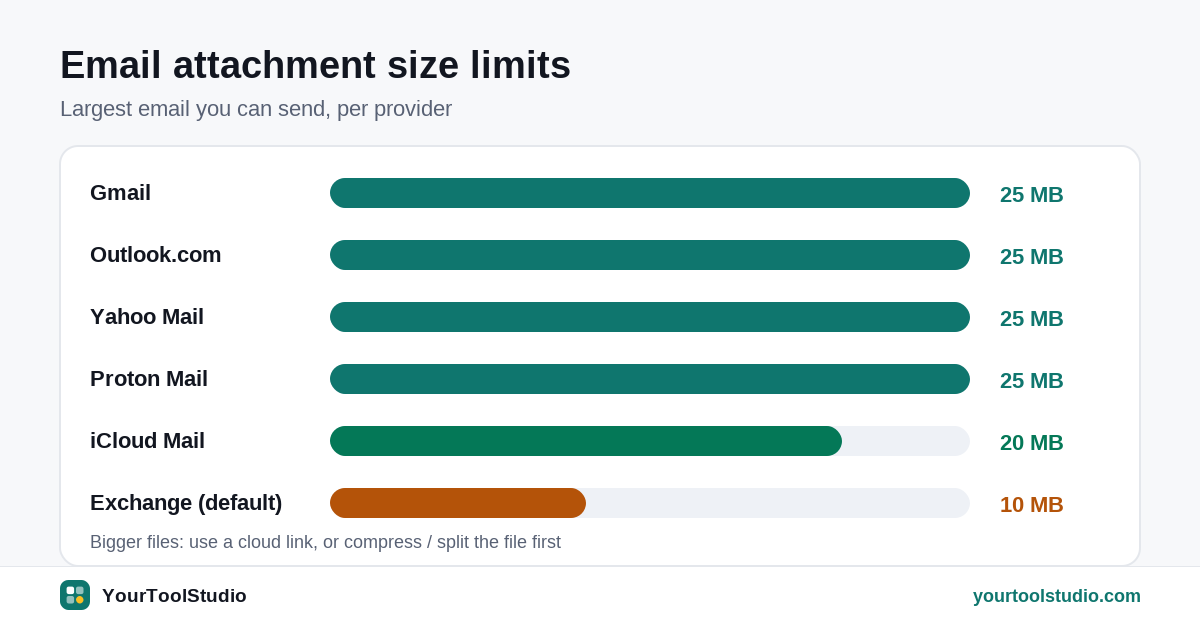
Most personal email services allow 20 MB to 25 MB of attachments per message. Because encoding enlarges files in transit, a file of about 14 MB is the safest size to send to any of the services below. All limits on this page were checked against the official pages linked in the chart on 18 November 2026.
Attachment limits chart
| Service | Sending limit | Receiving limit | Larger files | Official source |
|---|---|---|---|---|
| Gmail (personal) | 25 MB | Not stated on the help page | Automatic Google Drive link | |
| Google Workspace | Set by your administrator | 50 MB Enterprise Standard, 70 MB Enterprise Plus, after encoding | Google Drive link | |
| Outlook.com | 25 MB | Not stated on the help page | OneDrive files up to 2 GB | Microsoft |
| Microsoft 365 (Exchange Online) | 35 MB default, admin range 1 MB to 150 MB | 36 MB default, admin range 1 MB to 150 MB | OneDrive attachments up to 2 GB | Microsoft Learn |
| Yahoo Mail | 25 MB total | 25 MB total | None listed on the help page | Yahoo |
| iCloud Mail | 20 MB, or 5 GB with Mail Drop | 20 MB, or 5 GB with Mail Drop | Mail Drop, expires after 30 days | Apple |
| Proton Mail | 25 MB total, up to 100 files | 50 MB total | Proton Drive sharing | Proton |
Safe file size after encoding
Email sends attachments as text. RFC 2045 defines the Base64 method, which turns every 3 bytes into 4 characters and breaks the output into lines of no more than 76 characters. Providers publish slightly different figures for the increase: Microsoft uses 33% and Google says about 37%. The chart divides each limit by both figures and rounds down.
| Published limit | Largest file at 33% overhead | Largest file at 37% overhead |
|---|---|---|
| 10 MB | 7.5 MB | 7.2 MB |
| 20 MB | 15.0 MB | 14.5 MB |
| 25 MB | 18.7 MB | 18.2 MB |
| 35 MB | 26.3 MB | 25.5 MB |
| 50 MB | 37.5 MB | 36.4 MB |
| 70 MB | 52.6 MB | 51.0 MB |
These are our calculations, not provider limits. Not every service measures its limit after encoding, so a file above these sizes may still send. Staying below them avoids the problem wherever the message is going.
Where the published figures differ
- Outlook. Microsoft's Outlook.com sending limits list 25 MB, but its guide to reducing attachment size gives 20 MB for internet email accounts. If you use the Outlook app with an Outlook.com or Gmail address, plan for 20 MB.
- Business Exchange accounts. That same guide gives a 10 MB default for Exchange accounts, while the Exchange Online service description gives 35 MB. Your administrator's setting is the one that applies, so ask them if a message bounces.
- Microsoft 365 mobile apps. The service description lists a 33 MB message limit for Outlook for iOS and Android.
- Microsoft 365 on the web. Outlook on the web allows for encoding by restricting messages to 25% below the configured limit.
If your file is over the limit
| File type | First thing to try | Tool |
|---|---|---|
| Reduce the images inside it | Compress PDF | |
| Long PDF | Send it in numbered parts | Split PDF |
| Photo | Lower the file size before attaching | Compress Image |
| Video | Reduce the resolution or bitrate | Compress Video |
If Gmail has already replaced your file with a link, our guide explains why a PDF sends as a Google Drive link and how to reverse it.
Frequently asked questions
What is the maximum email attachment size?
Personal Gmail, Outlook.com, Yahoo Mail and Proton Mail allow 25 MB when sending, and iCloud Mail allows 20 MB. Microsoft 365 defaults to 35 MB, which administrators can change.
What size file is safe to email to anyone?
About 14 MB. Allowing for encoding, that fits within a 20 MB limit, the lowest personal limit in this chart.
Why does a 20 MB file fail with a 25 MB limit?
Encoding can make an attachment about a third larger in transit, so a 20 MB file can become more than 25 MB when the limit is measured after encoding.
Do multiple attachments count separately?
Usually not. Yahoo Mail and Proton Mail both state that their limit covers the total size of all attachments on a message.
How do I send a file larger than the limit?
Use the cloud option of your provider, such as Google Drive, OneDrive, Mail Drop or Proton Drive, or compress or split the file first.