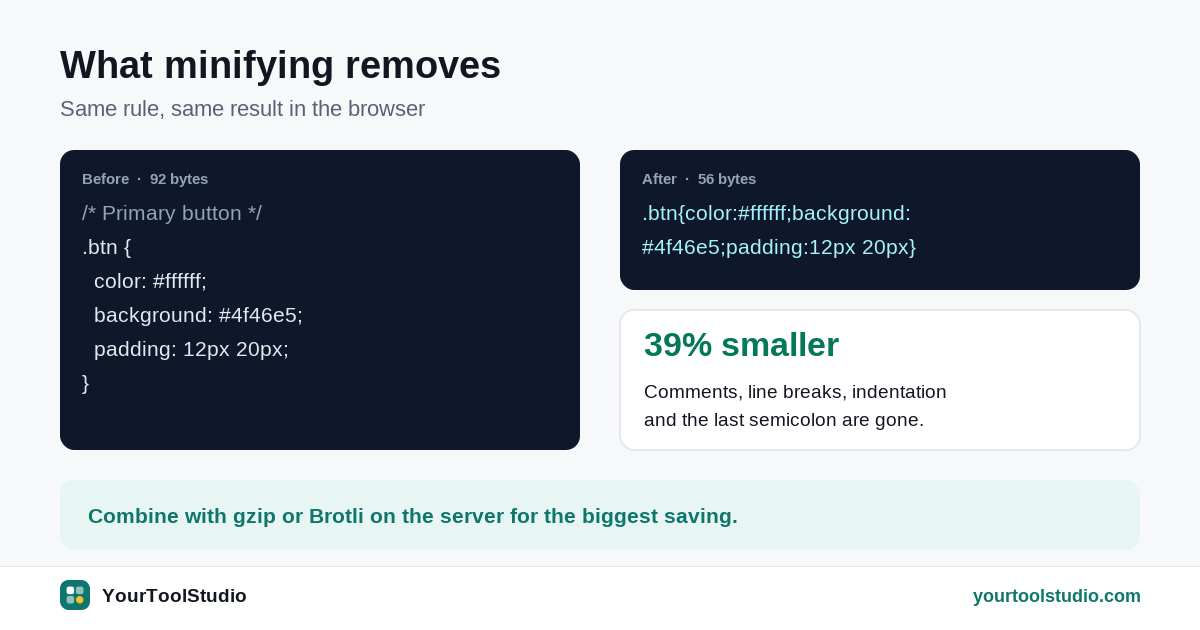
To minify a file is to remove everything a browser can do without: indentation, line breaks, comments and sometimes even optional attributes. The code does the same thing; it just takes fewer bytes. Smaller files arrive sooner, and on mobile data or patchy connections that means a faster page and better Core Web Vitals.
What you can expect to save
It varies by language. JavaScript, usually the heaviest resource, drops roughly 20 to 50 percent from basic minification and 40 to 70 percent when local variable names are also shortened (known as mangling). CSS typically loses 15 to 35 percent, mainly through shorter colour codes, unitless zeros and merged duplicate rules. HTML gains the least, around 5 to 20 percent, since most of it is content that has to stay.
| File type | Typical reduction | Why it matters |
|---|---|---|
| JavaScript | 20 to 50% | Often the largest file, and the slowest to parse |
| CSS | 15 to 35% | Lighter stylesheets mean faster rendering |
| HTML | 5 to 20% | The browser can start building the page sooner |
Minification and compression work together
People often assume gzip makes minifying pointless. It does not quite. Gzip and Brotli shrink files on their way to the browser by spotting repetition, and whitespace is exactly the kind of repetition they then have to encode. Minify first and the redundancy is gone before compression starts. On a big stylesheet the compressed size drops a few percent further; on JavaScript the combined effect is clearly noticeable.
JavaScript
JavaScript benefits most because it is both large and wordy. A good minifier strips comments, squeezes out whitespace and, with mangling on, renames internal variables such as userAccountIdentifier to a single letter. That is safe for local names because global names are never changed, so your public functions and load order stay as they were.
CSS
CSS shrinks neatly. #ffffff becomes #fff, zero values lose their units, colours get shorter and repeated rules are combined. Two things are always left alone: the text inside content or url(), where spaces are part of the value, and the media queries that make your design responsive.
HTML needs a lighter touch
HTML is where minification can catch you out. Whitespace between inline or inline-block elements shows as a real space on the page, so deleting the line break between two <span> tags glues their text together and shifts the layout. Anything inside <pre> or <textarea> is content, not formatting. A sensible HTML minifier collapses whitespace instead of removing it, respects those elements and keeps attribute quotes for safety.
Minify in your browser in seconds
There is no need to install and configure a build tool for a quick job. Paste HTML, CSS or JavaScript into YourToolStudio, press Minify and copy the slimmer version. Everything runs in your browser, so your own code and styles are never uploaded. The same pages can beautify code when you need it readable again for debugging.
HTML, CSS, JavaScript and more, free and private.
Frequently asked questions
Are minification and compression the same thing?
No. Minification deletes characters the code does not need, such as spaces and comments. Compression like gzip or Brotli encodes repeated patterns while the file travels. Use both, minifying first.
Does minified code behave the same as the original?
Yes, for well-formed code. A minifier only removes what parsers ignore or shortens local names. It cannot remove code you never use, which is why trimming dependencies often matters more.
Can minifying HTML change how my page looks?
It can in one case. Whitespace between inline and inline-block elements shows up as a visible gap, so deleting it pulls those elements together. Careful minifiers collapse that space rather than remove it and leave pre and textarea content alone.